Z WOBBLE UPDATE: (Long but worth it, please read...)
Greetings gang, back with today's update after another fix last night.
For those of you just joining us, in my struggle to fix the Z Wobble I have followed the Anycubic video for fixing Z Wobble twice and regardless of severity, the banding/wobble effect has persisted. (Old Pics 1, 2 & 3...)
Last night I loosened the two bolts that hold the Z Axis motor firmly in place. Many of us, myself included, are confused on how loosening parts would make a print better... well check this out:
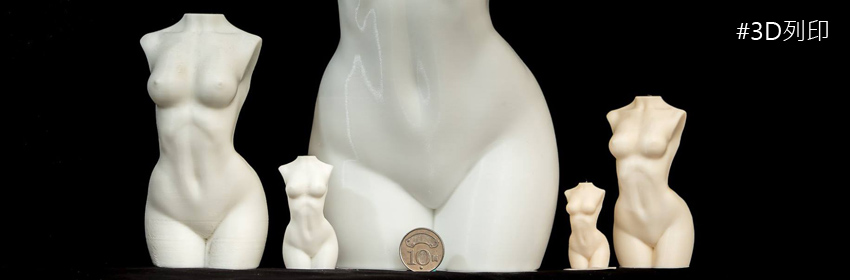
I reprinted the Elven Huntress last night with Monocure Rapid white, settings were .05/12/1/70/8.... and lo & behold... no banding/wobble effect! I'll be a monkey's uncle...
In Image 1 you can see some weird melting effect in the supports, not sure what that is.
In Image 2 you can see that I forgot to support the chin and tip of her ponytail braid. and lost them.
In image 3 you can see another bent base. I have this problem a lot... not sure if it's not cured enough (even thought the rest of the print is?) or if it's a support thing?
However... in Images 4 & 5 you can see that she is smooth... no banding or Z Wobble effect anywhere! My mind is blown... in my last post from last night while making the adjustment, I said quite clearly that I could see the whole Z Axis assembly and the carriage and build platform all loose and janky, and I was VERY concerned about how this would yield a better print. A few of you even agreed with me... "How does loosening parts make a better print"?
Well, lastly... look at Image 6. This compares my old wobble ridden print, with the test from last night. And it's obvious that the new one, from last night, with the loosened motor bolts is hands down the winner. I have some tweaks to make for the supports and such, but the print is beautiful...
Wrap up... here's my thoughts... for what they're worth...
1: We know that they redid the top of the Z Screw from V1 to V2 and made it free floating, so it there was any angle to it, it's not being restrained into place, causing any wobble.
2: If the carriage is nice and tight on the track, it doesn't seem to matter if the top and bottom of the Z Axis screw have play/movement in them.
3: I'm going to do another test print later today, something smaller and simpler to verify the wobble is all gone, but for now I'm amazed that making things looser actually helped.
Last but not least, the very final image shows the 2 screws to loosen. I did EXACTLY 180 degrees, a perfect half turn on each one. I panicked a bit when I saw how loose everything was, but the proof is in the pudding, right?
I'll be back with another update later today or tomorrow, please feel free to hit me up if you have any questions. And thanks to everyone helping me to fix this issue.
(I predict I'll be making a help video about all this in the future to help others!)
翻譯年糕